Run a call for papers
A call for papers lets anyone with a Zufest account propose a talk. Reviewers score the proposals, and your programme team decides which talks make the programme. Accepted talks arrive in the programme builder as draft sessions, ready to schedule.
Open the call
-
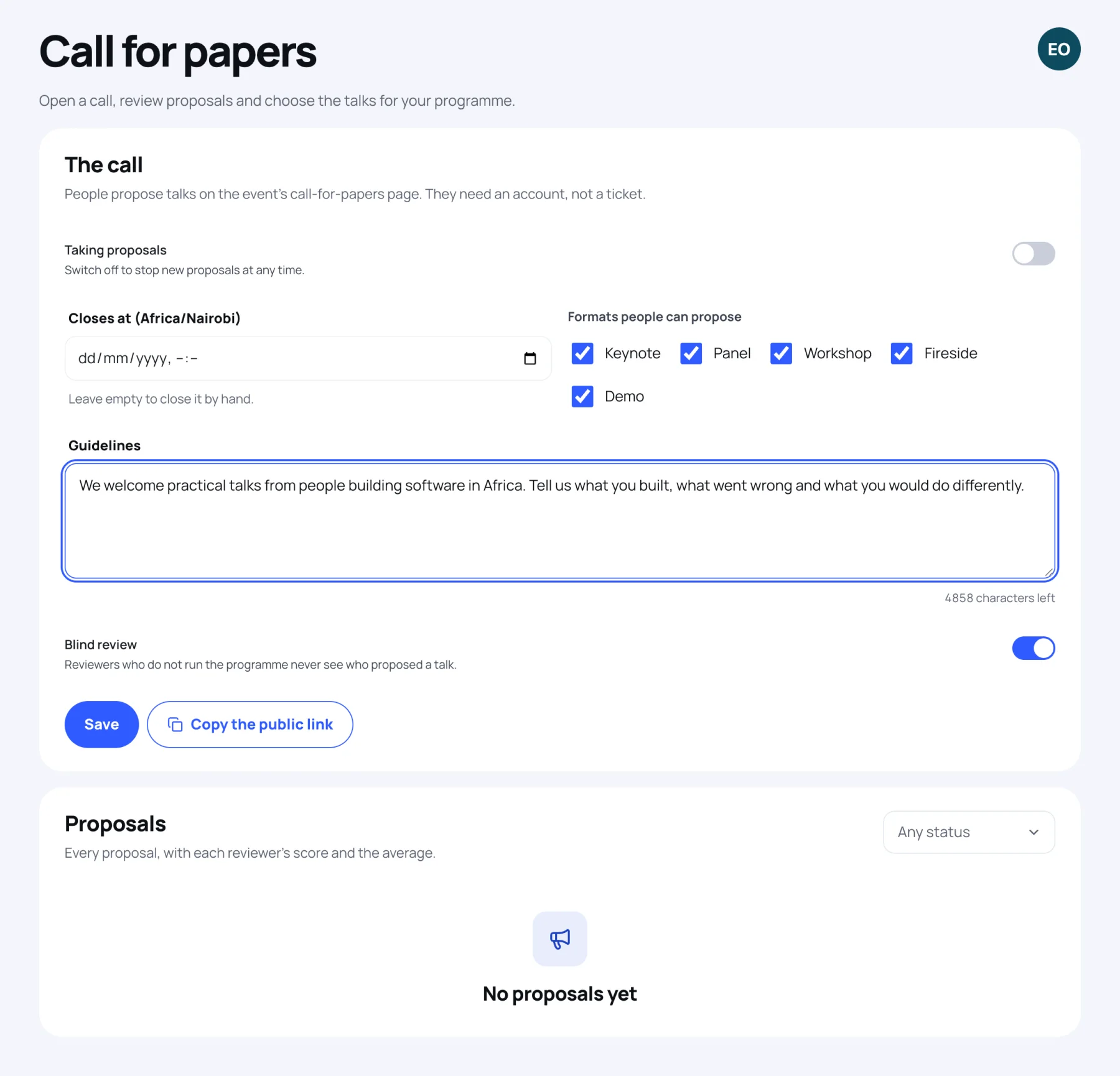
In the organiser sidebar, under Content, select Call for papers.
-
Switch on Taking proposals.
-
If the call has a deadline, set Closes at. It is in the event's time zone. Leave it empty to close the call by hand.
-
Under Formats people can propose, untick any you do not want: Keynote, Panel, Workshop, Fireside or Demo.
-
Write Guidelines: what you are looking for, and anything people should know before they propose. They appear on the public call page.
-
Leave Blind review on if reviewers should not see who proposed a talk. Your programme team always sees it.
-
Select Save.
-
Select Copy the public link and share it.
The public page is readable without an account, even for a private event, so you can share it with chosen speakers. Proposing needs an account but not a ticket.
What people send
Each proposal has a title, an abstract of at least 50 characters, a format, a length between 15 and 120 minutes, a level, an optional track, the speaker's name, job title, organisation and biography, and notes for the organisers. A person can have up to five proposals in play at one event. For their side, see Submit a proposal.
Review the proposals
Proposals are listed under Proposals. Filter them by status with the menu on the right.
- Your programme team sees every proposal with each reviewer's score and the average.
- A reviewer sees Not reviewed by you or You gave and their score. They never see other reviewers' scores or the average.
To review a proposal:
- Select it in the list. Its details open, with a note when blind review hides who proposed it.
- Choose Your score, from 1 to 5.
- Choose Your recommendation: Accept, Maybe or Decline.
- Add a Comment for the programme team if you like.
- Select Save my review. You can come back and Update my review: each reviewer has one review per proposal.
Decide
Deciding is for the programme team. Open a proposal, read the reviews and their average, and:
- Write a Note for the person who proposed it if you like. It is sent with the decision.
- Select Accept, Waiting list or Decline, then confirm.
| Decision | What happens |
|---|---|
| Accept | The speaker and an unpublished session with the title, abstract, format, track and length go into the programme. This cannot be undone here. |
| Waiting list | The person is told. You can still decide again later. |
| Decline | The person is told. You can still decide again later. |
An accepted session is placed at the start of the event. Open Programme, drag it to its time and hall, then publish it (see Build the programme).
Last updated