Check-in figures
The Gates screen keeps a running count of arrivals, so you can see at a glance whether the queue is moving and which door needs more people.
Read the figures
In the sidebar, select Badges and gates.
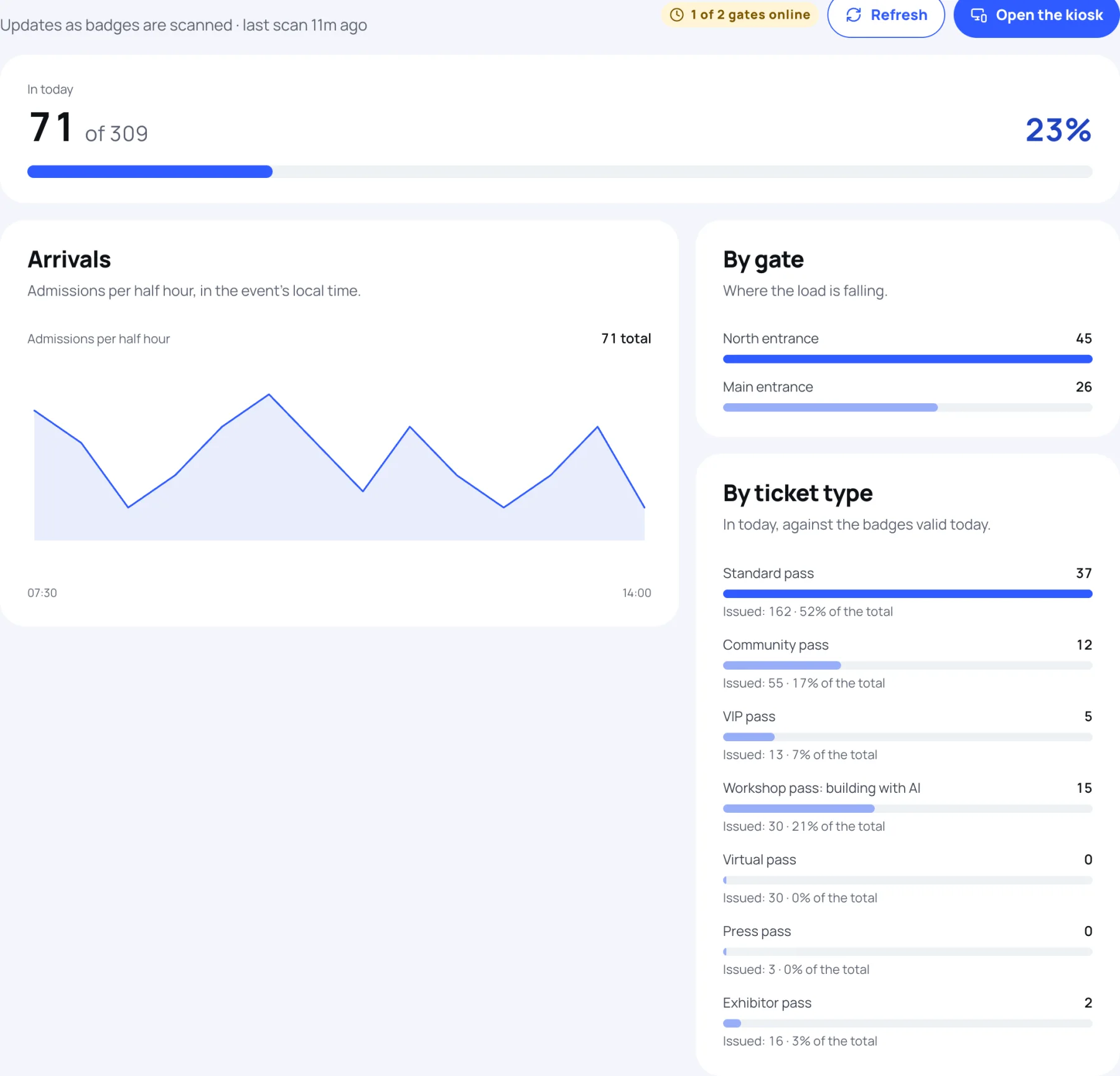
| Figure | What it counts |
|---|---|
| In today | People admitted today, out of every badge that is issued, still valid and valid today (day passes for other days are left out), with the percentage. Each person counts once a day, however often they come back in. On a multi-day event the count starts again each morning. |
| Arrivals | Admissions per half hour today, in the event's local time, with the day's total. |
| By gate | Admissions at each gate today. |
| By ticket type | For each pass, how many are in today against the badges valid today, and its share of all badges. |
Gates online
At the top, a pill such as "2 of 2 gates online" counts the gates that have scanned in the last 15 minutes, out of every gate used today. A gate goes quiet when nobody is scanning there, or when its device has lost its connection.
Next to it, the subtitle says when the last scan was.
Keep it up to date
Your own scans update the screen as you go. To pick up scans made at other gates, select Refresh.
For figures across the whole event, such as registrations and revenue, see the event dashboard.
Still stuck?
Tell us what you were trying to do and we will help.
Contact us
Last updated